
VidMate APK Download 2026 (Latest + Old Versions)
Save videos and music from your favourite sites straight to your Android phone. Get the official latest VidMate in one tap — or pick a VidMate old version that suits your phone.
- HD video downloads
- MP3 converter
- Many sites
- Fast downloads
- Free

VidMate
Official latest buildOfficial file from the VidMate servers. Tap “Download anyway” if Chrome warns about APK files.
VidMate old version or the latest?
Most people should install the latest version — it has the newest site support and security fixes. Older builds are smaller and can feel faster on old or low-storage phones.
| Version | Status | |
|---|---|---|
| VidMate 6.0302 | Latest · Sep 11, 2026 · 33.7 MB | Download |
| VidMate 5.3485 | 2026 · Android 5.0+ | Download |
| VidMate 5.2877 | 2024 · Android 4.3+ | Download |
| VidMate 5.1904 | 2024 · Android 4.3+ | Download |
| VidMate 5.0966 | 2023 · Android 4.3+ | Download |
What VidMate can do
VidMate is a video downloader and player for Android. It isn’t on Google Play because Google doesn’t allow apps that download from YouTube, so it is installed as an APK.
Download videos
Save videos from YouTube, Facebook, Instagram, TikTok, Dailymotion and many other sites.
Choose the quality
Pick anything from small 144p files to full HD, depending on your data and storage.
Convert to MP3
Save only the audio of a video — handy for songs, podcasts and speeches.
Fast, parallel downloads
Download several files at once, pause and resume later, even after losing the connection.
Built-in download manager
Find, rename, play and delete everything you saved in one place.
Video & music player
Watch downloads offline and play music in the background.
Offline sharing
Send downloaded files to nearby friends without using mobile data.
Private folder
Hide selected downloads behind a password.
Status saver
Save WhatsApp statuses and short videos you like.
How to download and install VidMate
Download the APK
Tap Download VidMate APK. If Chrome says the file might be harmful, tap Download anyway.
Allow the install
Open the file. Android asks to allow installs from your browser — turn it on once, then go back.
Install and open
Tap Install, then Open. Allow storage access so VidMate can save your files.
Download a video with VidMate
- Open VidMate and search for a video, or tap a site icon (YouTube, Facebook, Instagram…).
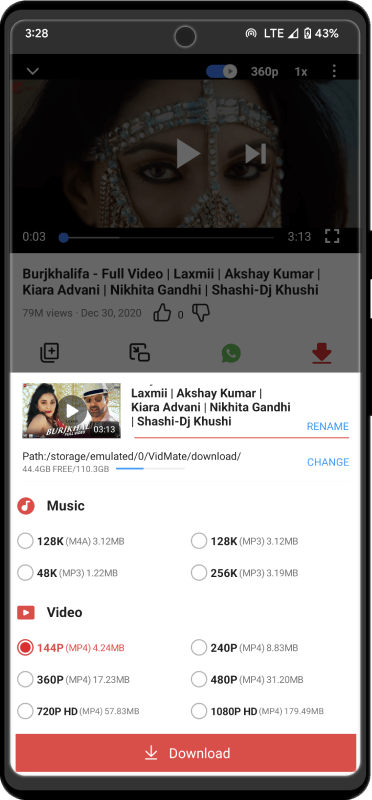
- Open the video and tap the red download button.
- Choose the format: a video resolution or MP3 for audio only.
- Find the file under Me → Downloads, or in your phone’s gallery.
Tip: you can also copy a video link from any app and paste it into VidMate’s search bar.
Is VidMate safe?
The download button on this page links to the official VidMate file — we don’t modify or repackage it. Fake “VidMate” APKs from random sites are the real risk, so always check the size and version shown above.
Keep in mind that VidMate is ad-supported and asks for several permissions. Security researchers have criticised it in the past for aggressive advertising, so keep it up to date, don’t give it permissions it doesn’t need, and uninstall it if you notice unusual data or battery use.
Only download videos you are allowed to save — for example your own uploads or content with a free licence.
Frequently asked questions
Is VidMate free?
Yes. VidMate is free to download and use. It shows ads to pay for itself.
Why isn’t VidMate on the Google Play Store?
Google doesn’t allow apps that download videos from YouTube, so VidMate is distributed as an APK from its own website.
Which is the latest version of VidMate?
The latest official build is VidMate 6.0302, released Sep 11, 2026. This page updates automatically when a new version comes out.
Where can I find VidMate old versions?
On our VidMate old version page, with advice on which version to choose for your phone.
Does VidMate work on PC or iPhone?
VidMate is Android-only, but you can run it on a PC with an emulator — see VidMate for PC. There is no iPhone version; see VidMate for iOS.
Why does Chrome say the file might be harmful?
Chrome shows that warning for every APK downloaded outside the Play Store. If the file came from the button on this page, tap Download anyway.
Where are my downloaded videos saved?
Inside VidMate under Me → Downloads, and in the VidMate/download folder of your phone storage.
Get VidMate 6.0302
Official build · 33.7 MB · updated Sep 11, 2026